
RightBlogger Review: An Honest Take for Fast, SEO-Ready Blogging in 2025
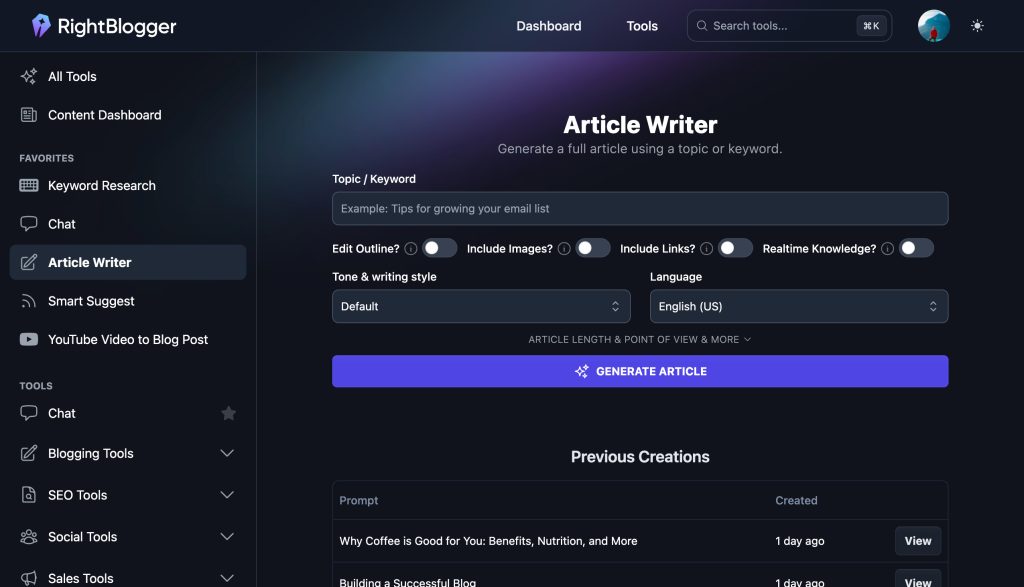
Bloggers who want faster drafts and stronger on-page SEO will look at tools like RightBlogger with high hopes. RightBlogger.com is an AI writing toolkit built for blog content and on-page SEO tasks, from ideas to drafts to meta fields. It helps solo bloggers, niche site owners, and agencies that publish often. If you are hunting for the Best Ai writer, this review shows where RightBlogger shines, and where it needs a human touch. Features and pricing change, so check the site for current details. Below, you will find what you need to make a call: features, writing quality, speed, pricing structure, and pros and cons.
What is RightBlogger.com and who is it for?
RightBlogger is a focused platform for people who publish blog content on a consistent schedule. Its tools cover ideas, outlines, full drafts, optimization prompts, and simple steps that fit a blog publishing workflow. Think of it as a writing bench with clear drawers, not a general toolbox with every gadget. You open a template, give it the topic and angle, then move from outline to draft to publish-ready assets.
The core use cases are familiar if you run content sites. You can generate blog post ideas and outlines, write full posts or sections, and build content briefs for a clean structure before you write. You can also produce titles, meta descriptions, and FAQs for on-page SEO, then create social teasers to promote the post after it goes live. If you update old posts, you can use rewrite and expand tools to refresh sections or add missing detail.
RightBlogger fits content sites that publish weekly, freelance writers who juggle clients, small teams that want repeatable briefs and tone, and newsletter writers who repurpose posts into issues. It feels tuned for fast blog execution, not for every possible content format. If you need long technical documents, white papers, or deep research reports, this may not be the right fit on its own.
Getting started is simple. You create an account, land on a clean dashboard, and pick from a set of templates. The flow is template-first. You enter your topic, pick tone options, and save projects in folders so your work stays tidy. It takes minutes to understand how to move from a topic idea to a draft to export.
Quick look at the tools that matter for bloggers
- Blog post ideas and outlines that match a target topic, handy for planning.
- A draft generator with tone choices and simple prompt controls that keep the voice on brand.
- Title ideas, meta descriptions, and FAQ prompts that cover on-page SEO basics.
- A content brief builder so structure is set before writing starts.
- Rewrite and expand tools that help refresh and extend existing posts.
- Export and copy options so you can move content into your CMS without friction.
These are the tools most bloggers will use daily. Next, we will see how the writing feels in real use, how accurate it is, and how much control you have from prompt to draft.
How the AI writes: tone, accuracy, and control
Tone presets are consistent across drafts. Casual, neutral, and expert tones feel distinct, and they stay stable unless you give conflicting cues. You can steer voice with short notes like “short sentences” and “avoid hype.” Instructions like that stick well.
Clear prompts cut fluff. Give the tool a direct topic, target reader, and goal. Add two or three key points to cover. Keep it tight. You will see fewer vague lines and more useful detail.
Like any AI, it can miss facts or oversimplify. Light fact checks prevent slip-ups, especially with dates, stats, or any claim that needs a source. For how-to guides, verify steps and add photos or links as needed.
You can control length and headers by setting the number of sections, requested word range, and examples to include. The output obeys section names and can insert simple examples when asked. For complex posts, lock the outline first, then expand each section. That approach gives you more control over depth and detail.
Hands-on test: content quality, SEO help, and workflow speed
To see how RightBlogger performs, I ran a simple test on a mid-tail topic with clear search intent: “how to prune basil.” The plan: generate an outline, expand to a draft, then add a title, meta description, and FAQs. I aimed for a readability score near 60 to 70, short sentences, and clear headers.
I started with the content brief template, asked for a beginner-friendly guide, and listed key points: why pruning matters, when to prune, where to cut, and mistakes to avoid. The outline came back with clean H2s and H3s that matched search intent. I then expanded to a full draft in a neutral, practical tone.
Time to first draft was under 10 minutes. Edits and checks took another 25 minutes. Total time to a publishable version was about 35 minutes. The draft read smoothly, avoided heavy filler, and had a logical flow. It offered specific tips like pinching above a leaf node and avoiding cuts near the base during early growth. I added a few facts on growth stages, inserted two images, and linked to a trusted gardening source.
For on-page SEO, the title and meta description tools kept character limits in line and used the main term without stuffing. The FAQ suggestions matched common questions like “How often should I prune basil?” and “Can you eat the flowers?” Keyword coverage in headers felt natural. I added one internal link and one external source.
Edit effort was light. I fixed a small detail on pruning frequency during peak growth and added a note on sterilizing shears. With this balance of speed and control, many users could call it their Best Ai writer for routine how-to posts, especially if they value quick drafts with solid structure.
AI writing quality on outlines, sections, and full drafts
Outline logic is strong. Headers mirror search intent, and each section carries a clear purpose. You get a path you can follow without guesswork.
Section depth is decent out of the box. If you ask for an example or a quick checklist in each section, it complies. Simple examples land best, such as “make your cut a quarter inch above a pair of leaves.”
Generic filler shows up when prompts are vague. State the reader level, target angle, and key points to cover. Short, direct prompts reduce broad claims and keep the copy specific.
Human edits lift the work most in the intro hook, data points, and examples. Add a stat, a photo, or a short story from your own experience. That small layer turns a good draft into a helpful guide that reads like it came from your site.
Summary: strong for first drafts, needs light fact checks.
SEO helpers that actually save time
The title and meta tools output options that fit common character ranges, which saves a trip to a counter. You get several variations, so you can pick a version that matches tone and search intent.
The FAQ generator suggests questions that readers would ask. These often match People Also Ask style queries. You can lift the best ones and answer them cleanly.
Use internal prompt tips to align H2 and H3 terms with the main keyword. Ask the tool to include one primary term in one or two headers, then use variations in the body. This keeps coverage strong without stuffing.
These built-ins reduce context switching. You can keep your focus in one tab instead of bouncing between a notes app, a SERP snippet tool, and your CMS.
Workflow and collaboration for busy publishers
RightBlogger supports simple project organization. You can group drafts and briefs by site or client using folders or tags. That keeps work visible when you run multiple sites.
Reusing prompts and style notes helps keep brand voice tight. Save a short tone guide and a checklist of must-have elements. You can paste those into templates so every draft starts aligned.
Export is clean. You can copy with headers intact and move content into your CMS. Set good file names and slug suggestions during export to avoid messy URLs later.
The interface keeps focus on the writing task. You are not buried in tabs or complex toggles. A practical tip helps here: keep a short checklist for fact checks, links, images, and alt text before you hit publish.
Pricing, limits, and value for money
Like most AI writing platforms, RightBlogger uses monthly plans with usage limits, plus savings on annual billing. Tiers usually separate solo users from teams, with higher caps and extra features on upper levels. Expect limits tied to words, credits, or projects per month, and plan your output around those caps.
Support can differ by tier. Higher plans may get faster replies or priority help. Some tiers may also process longer drafts or allow more users under one account. If you run a team, check collaboration features and seat counts before you commit.
To judge value, look at your posts per month and the time you save per draft. If you run ads or affiliate offers, estimate how many posts you need to break even. Agencies can measure value by client deliverables per week and revision time saved.
Blogger-focused tools win when you want clean outlines, useful SEO helpers, and a flow that mirrors how blogs get made. If you need deep keyword research or competitive analysis, a dedicated SEO tool may be a better companion. Pairing a writing tool with a research suite often gives the best of both worlds.
Check RightBlogger.com for current pricing and features. Plans and limits can change.
What you get on each plan
- Access to core writing and SEO templates on all paid tiers.
- Higher usage limits and team seats on upper tiers.
- Priority support or faster generation on upper tiers if offered.
- Annual billing perks may reduce your monthly rate.
Confirm these details on the pricing page before you buy.
How it compares to Jasper, Copy.ai, Koala, and Surfer add-ons
RightBlogger focuses on blog workflows. Templates, outlines, briefs, and on-page helpers are front and center. Jasper and Copy.ai cover a wider range of copy types, from ads to emails to landing pages. If you write across many formats, you may prefer those broader platforms.
If your process leans on deep research, a stack that includes a dedicated SEO tool or add-on might fit better. Surfer add-ons, for example, tie writing to content scores and SERP data. That can help for competitive niches, but it adds complexity.
A one-tool setup speeds work for teams that already know their topics and only need fast, structured drafts. If your bottleneck is writing speed, RightBlogger keeps things simple and focused.
Is it worth it for solo bloggers, agencies, and niche sites?
- Solo blogger: a weekly post cadence becomes easier. You get faster drafts and more time for outreach and updates.
- Agency: briefs and tone stay consistent across writers. Handoffs get cleaner and output becomes more predictable.
- Niche sites: refresh tools help update old posts and add FAQs, which can lift engagement without full rewrites.
Back-of-the-napkin ROI: if one post in a month pays for the tool, it makes sense. Many sites can clear that bar with affiliate or ad earnings, or with one client article.
Is RightBlogger the Best Ai writer for bloggers in 2025?
For bloggers who want speed with structure, RightBlogger earns a spot near the top. It delivers clean outlines, quick drafts, and simple SEO helpers, and it stays out of your way while you write and edit.
The best part is the blog-first focus. The tools match how posts get made, from brief to draft to on-page polish. You get fewer distractions, which helps you ship more often. The writing holds a steady tone if you guide it well, and the prompts respond to clear instructions.
The tradeoffs are expected. You still need to check facts, add your data or sources, and tighten intros. If you require deep research or advanced content scoring, pair it with a separate SEO tool. For heavy technical writing, this would not replace a subject matter workflow.
If your goal is steady publishing and faster first drafts, RightBlogger fits. It scales from solo writers to small teams and keeps the editing workload reasonable. Many bloggers will find it good value when they track time saved and posts shipped.
Pros that make it stand out
- Blog-first templates that reduce setup time.
- Clear outlines and helpful FAQs for on-page SEO.
- Simple UI, fast drafts, low learning curve.
- Good for updating and expanding old posts.
- Scales from solo to small teams.
Cons to keep in mind
- AI can add filler without tight prompts.
- Facts still need checks and sources.
- Keyword research depth may be basic for some users.
- Some features may require higher tiers.
Who should choose it, and who should skip it
- Choose it if you publish blogs often and want speed with solid structure.
- Good for content teams that want repeatable briefs and drafts.
- Skip if you write technical manuals or need advanced research features.
- Pair with a dedicated SEO research tool for competitive niches.
Conclusion
RightBlogger suits solo bloggers, niche site owners, and agencies that publish often. It speeds up drafts, keeps structure tight, and makes on-page SEO smoother. If you want a focused tool that gets you from topic to publishable draft quickly, it could be your pick for the Best Ai writer this year. To move forward, start a trial or review the plans, and confirm current pricing and features on the site. Keep a simple editing checklist for facts, links, and images so every post meets your standard. Thanks for reading, and happy publishing.
